

Updated November 11, 2026 · 9 min read
iPhone Fold size and weight, folded and open.
Exact iPhone Duo dimensions from Apple's specs, what they mean in your hand and pocket, and how a case changes them.
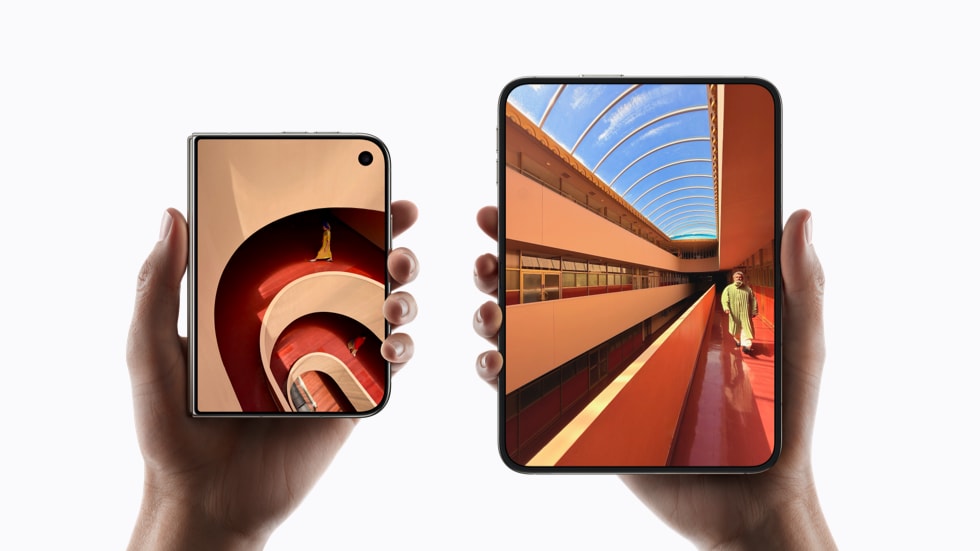
iPhone Fold size and weight
Apple's foldable, the iPhone Duo, from Apple's official specs (Apple):
| Folded | Open | |
|---|---|---|
| Height | 117.8 mm (4.64 in) | 117.8 mm (4.64 in) |
| Width | 84.1 mm (3.31 in) | 164.6 mm (6.48 in) |
| Thickness | 11.3 mm (0.44 in) | 5.2 mm (0.21 in) |
| Screen | 5.4 in, 1398×2034 | 7.6 in, 1878×2670 |
| Weight | 254 g (8.96 oz) | |
Folded: what it's like in your hand
Folded, it's short and wide rather than tall and narrow. At 117.8mm tall it's noticeably shorter than a regular iPhone, and at 84.1mm it's a little wider. Apple says the 5.4-inch outer screen gives you 90 percent of the screen area of iPhone 18 Pro (Apple), so texting, maps and music feel normal without opening it.
At 11.3mm thick closed, it's thicker than a regular iPhone, the main trade-off of any book-style foldable.
Open: how big the screen really is
Opened, you get a 7.6-inch screen at 164.6 × 117.8mm, roughly the shape of a paperback page turned sideways. It's the largest screen Apple has put on an iPhone (Apple). And at 5.2mm, the open phone is the thinnest iPhone Apple has made.
Same shape, both screens
Both screens share an aspect ratio, so an app looks the same, just bigger, when you open the phone. That's different from foldables where the outer screen is tall and skinny.
Weight: 254 grams
At 254 grams (8.96 oz) it's heavier than a standard iPhone. Reviewers list the weight as a trade-off alongside no separate telephoto lens and no Face ID, while still calling it pocket-friendly when folded (T3). The design combines an outer screen, an inner screen and a hinge: you're carrying a phone and a small tablet in one.
Pockets, bags and one-handed use
- Front jeans pockets: the shorter height helps; the thickness is what you'll notice.
- Jacket pockets and bags: check the opening and compartment size.
- One hand: test your reach while folded. Open, use two hands or set it down.
- Video calls and watching: half-open on a table, or use a kickstand case.
How a case changes it
A case adds thickness and weight. Thin cases add little; folio cases cover the outer screen and add the most. Apple's Folio with Kickstand is designed to stay thin and light. Our cases and screen protectors guide compares the options.
Try it in person
Size and weight are personal. The best test is holding one, folded and open, for a few minutes. Find a nearby store with the Store Locator, and if you buy one, Apple's return window gives you time to be sure; see Apple's return policy.
Read the measurements in the same orientation
The open body measures 164.6 × 117.8 × 5.2 mm. The closed body measures 84.1 × 117.8 × 11.3 mm. Those figures describe the device, not the active display. Keep width and height consistent when comparing the two states. Opening the phone changes the space it needs in your hands. It does not turn the whole body into usable screen.
The headline screen sizes are diagonal measurements. They are not measurements across the front of the phone. A diagonal alone cannot tell you how wide a keyboard feels, how much text fits on a page or whether your thumb reaches a control. Use the dimensions to plan a hands-on test, rather than trying to predict every part of daily use from a single number.
What the outer-screen comparison means
The outer screen has about 90 percent of the screen area of iPhone 18 Pro. That is an area comparison, not a claim that the two phones have the same shape. It also does not mean every app shows the same amount of content. Text size, menus and the app's layout all affect what you can see without scrolling.
Think about which tasks you want to finish without opening the phone. Replying to a short message, checking a list and changing music are useful tests. Try the actual keyboard and controls. A screen can have enough area for a task while still placing an important button outside your comfortable reach. Your grip matters as much as the headline size.
The closed width deserves special attention. Hold the phone as you would while standing in a queue, not only with both hands at a display table. Can you support it securely while tapping? If you need to shift your grip often, that is worth noticing. A short body does not automatically make a wide phone easy for every hand.
Test content, not just the home screen
Open a long article and set text to a size you can read comfortably. Then try a photo, a map and a document. Each uses the extra space differently. Reading may benefit from a broader page. A photo depends on its own shape. A map can show more context, but the labels still need to be easy to read.
Video is another useful test. A larger display does not mean every video fills the panel. The shape of the clip and the player controls affect the picture you see. Check whether you prefer the full image with unused space or a crop that fills more of the screen. Neither choice changes the physical size of the phone.
Try the change from closed to open in an app you care about. Look at where the text, keyboard and buttons end up. Do not assume every app uses the larger screen in the same way. The useful question is whether your common tasks become easier, not whether the open display looks impressive in a quick demonstration.
Balance matters as well as mass
The phone weighs 254 g whether it is folded or open. What changes is how you support it. Closed, your hand holds a compact stack. Open, the weight is spread across a wider body. That can change the strain on your fingers even though the scale reading stays the same. Try both positions rather than judging the weight from one brief lift.
Hold it long enough to read a page or type a proper reply. Notice whether you rest an edge on your little finger or tighten your grip. You do not need to force a one-handed hold to make the phone feel convenient. A comfortable two-handed grip may be the better trade-off if the larger screen is what you want.
Grade 5 titanium is part of the device's construction. It does not make the finished phone weightless or immune to damage. Judge the complete device at its stated weight, then include the accessories you plan to carry. Avoid assuming that a premium material cancels out the practical effects of a broad body or a heavier case.
Check the pocket you actually use
Pocket fit depends on the opening, depth and fabric, not just the phone's height. A phone may slide into a pocket while standing but press against you when seated. Test sitting, bending and taking it out again. Do this carefully in a suitable setting. A good fit should let you retrieve the phone without pulling hard on the fabric.
For a bag, check the compartment rather than the bag's overall size. A narrow phone sleeve or a crowded zipped pocket may be the limiting space. Think about what shares that compartment. Keeping the phone away from loose keys and hard objects is a more useful habit than assuming its frame material prevents all marks.
One-handed use should include taking the phone out and putting it away. Opening it is a separate action. If you often carry shopping or hold a rail on a commute, consider whether you can finish your usual quick tasks on the outer screen. Save tasks that need the inner display for a place where you can use both hands securely.
Protection changes the shape you carry
Check the dimensions and weight of the actual case you plan to buy. Do not add a guessed allowance and treat it as a measured total. Raised edges, hinge coverage and a stand can each affect how the phone feels in a pocket. Grip can improve even when bulk increases. The best choice depends on which problem you need the case to solve.
IP68 is the device's stated resistance rating. It is not a reason to treat the phone as immune to water or dust damage. Follow Apple's care instructions and check the conditions attached to that rating. A case is not automatically waterproof either. Keep protection claims separate from your decision about pocket fit, comfort and screen access.
A short hands-on checklist
- Start closed. Type a message and reach for controls near the screen edges without changing your normal grip.
- Open it carefully. Read a page, inspect a photo and try the tasks that justify the larger display for you.
- Check comfort. Hold it for more than a quick glance. Try both hands and a supported position.
- Consider the whole carry. Include your intended case, pocket and bag. Ask before testing pocket fit with a display unit.
Call the store if a hands-on demo is the main reason for your trip. Pickup inventory does not establish that a display unit is available to try. If you decide to buy, review the return terms that apply to your purchase. Keep the receipt and any required packaging. A return window is a chance to assess fit, not a substitute for reading those terms.
Make your decision around a normal day. Think about the messages you send while standing, the reading you do while seated and how often you would open the phone. If the inner screen solves a task you do often, the extra carry may be worthwhile. If most of your use stays on the outer screen, pay closer attention to closed width and weight. The right fit is the one you can use comfortably, not the one with the most striking spec sheet.
Comparing phones? See iPhone Duo vs 17 Pro Max and full specs.
Questions and answers
How big is the iPhone Fold?
Folded, the iPhone Duo is 117.8mm tall, 84.1mm wide and 11.3mm thick. Open, it's 164.6mm wide and 5.2mm thick.
How much does the iPhone Duo weigh?
254 grams, or 8.96 ounces.
What are the screen sizes?
5.4 inches on the outside and 7.6 inches on the inside.
Does the iPhone Duo fit in a pocket?
Yes. Folded, it is 117.8mm tall, shorter than a regular iPhone, and reviewers describe it as pocket-friendly. It is thicker than a regular iPhone, at 11.3mm.
Is it heavier than a regular iPhone?
Yes. Reviewers note it's heavier than a standard iPhone, which is common for foldables.
More answers about checks, alerts and plans are in the Produce Checker help and FAQ, and more guides are on the iPhone Duo stock blog.
Produce Checker is not affiliated with Apple Inc. Measurements come from Apple's iPhone Duo technical specifications, checked November 11, 2026. Stock isn't guaranteed and Apple confirms pickup at checkout.