

Updated November 11, 2026 · 9 min read
iPhone Fold cases and screen protectors.
Apple's and third-party cases for the iPhone Duo, which outer screen protectors to use, and why you shouldn't put one on the inner screen.
Do you need a case on a foldable?
Yes, if you want to protect a $1,999-plus phone. A foldable has two screens, a hinge and more parts to repair. Without AppleCare+, Apple charges $199 for back glass, $379 for the outer screen and $999 for the inner screen on the iPhone Duo (MacRumors). A case is cheap insurance for the outside; the inside screen needs care, not a protector (more below).
New to the phone? See iPhone Fold: it's called iPhone Duo.
Apple's iPhone Duo cases
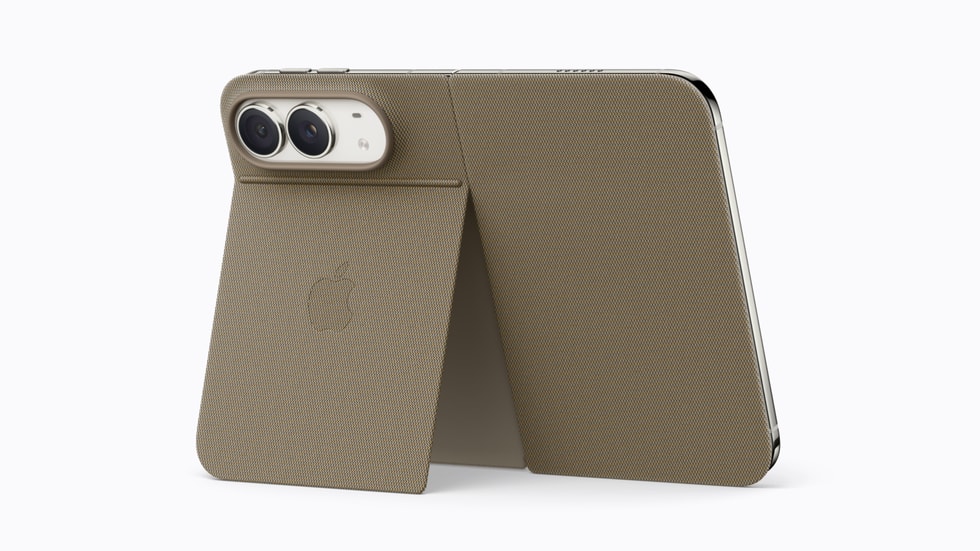
iPhone Duo Folio with Kickstand, $129
Made from TechWoven fabric with a built-in kickstand for reading, video and FaceTime. Built-in magnets line up with MagSafe and Qi2 chargers, so you can charge without removing it (Apple). It comes in Taupe and Navy Blue. Compare all official iPhone Duo cases for photos and prices.
iPhone Duo Case
The slimmer option, $79 at Apple (Apple), in Navy Blue and Sand, for people who want protection without a cover over the outer screen. See Apple's current list on its iPhone Duo accessories page.
Third-party cases
Case makers moved fast. Spigen, for example, lists iPhone Duo cases from $49.99 (Ultra Hybrid Pro) to $89.99 (Slim Armor Pro Mag Fit), plus Tough Armor Pro at $69.99 (Spigen). Prices as listed November 11, 2026.
| Apple Folio with Kickstand | $129 |
|---|---|
| Apple iPhone Duo Case | $79 (launch price) |
| Spigen Ultra Hybrid Pro | $49.99 |
| Spigen Tough Armor Pro (Mag Fit) | $69.99 |
| Spigen Slim Armor Pro (Mag Fit) | $89.99 |
Before buying any case, check it's made for the iPhone Duo specifically, that it covers the hinge if you want hinge protection, and whether it supports MagSafe.
Which type is right for you
- Slim two-piece case: lightest, keeps the phone close to its original size. See size and weight.
- Folio: covers the outer screen too, good for bags and drops. Adds the most bulk.
- Kickstand: great if you watch video or video call with the phone half-open.
- Rugged: hinge cover and thicker corners for active use or kids.
Outer screen protectors
The 5.4-inch outer screen works like a normal phone screen, and glass protectors are available, for example Spigen's GLAS.tR EZ Fit Pro at $34.99 (Spigen). An alignment kit makes installation much easier. A replacement outer screen from Apple without AppleCare+ is $379 (MacRumors), so a protector is worth it.
The inner screen: don't add a protector
The 7.6-inch inner screen already has a cover layer on top with a matte nano-texture finish. Apple's Kate Bergeron says it's designed to wear in slowly, helps hide the crease, and is replaceable (9to5Mac). Apple charges $19 to replace it with AppleCare+ and $49 without (MacRumors).
- Don't peel it off. It isn't a shipping film. Replacement is a service job.
- Don't stick a film over it. It changes the matte finish and can trap dust in the fold.
- When it wears, have Apple replace the layer.
Everyday care for the fold
- Keep the fold free of sand, crumbs and grit before closing.
- Don't press hard on the inner screen with nails or a stylus not made for it.
- Never close it on earbuds, cards or keys.
- Clean with a soft, slightly damp cloth.
- Consider AppleCare+; an inner screen repair drops from $999 to $99. See is AppleCare+ worth it.
Shopping in person? Most Apple Stores stock the Folio. Find one with the Store Locator.
Choose for the way you carry the phone
Start with your daily routine, not the most expensive case. Do you carry the Duo in a pocket or a bag? Do you use the outer screen most of the time? Do you often set the phone down for video calls? These questions help you decide which features you will actually use. A stand is useful if you need a stand. It is not a reason to buy a larger case if you never prop up the phone.
For pocket use, compare the slimmer Apple Case with the two-piece options. For a bag, decide whether you want a folio over the outer screen. If hinge coverage matters to you, look for that feature in the exact product listing. Do not assume that a rugged name means every part of the phone is covered. Check the pictures and description before choosing.
Also think about how you charge. Apple's cases have magnets for MagSafe and Qi2. With a third-party case, check the listing rather than assuming the whole range has the same features. Pick the case first, then check whether the outer protector you want works with it. A low price is less useful if the accessories do not fit together.
Build a protection budget
The Apple Case at its $79 launch price plus the $34.99 GLAS.tR outer protector totals $113.99. The $129 Folio plus that protector totals $163.99. The difference is $50. That is a choice about the folio cover and stand, not proof that the more expensive setup will prevent a repair. Neither total includes the phone or AppleCare+.
At the listed Spigen prices, a $49.99 case plus the $34.99 protector comes to $84.98. The $89.99 case plus the same protector comes to $124.98. That leaves a $40 difference between those combinations. Compare the features you want before spending it. Price alone does not tell you how a particular fall will end.
You can also buy a case without an outer protector. The $129 Folio costs $50 more than the $79 Apple Case at launch. Ask whether you want its cover and kickstand enough to pay that difference. Do not count a possible avoided repair as money already saved. You may never damage the phone, and a case is not a repair guarantee.
Use repair prices as context, not promises
Without AppleCare+, the $379 outer screen repair is $344.01 more than the $34.99 protector. That gap explains why a protector may appeal to you. It does not show that the protector will prevent $379 of damage. It also does not mean a protector replaces coverage. An accident may affect parts that an outer screen protector does not cover.
The inner cover layer is a different budget item. Apple charges $49 without AppleCare+ or $19 with it, a $30 difference. An inner display repair is $999 without coverage or $99 with it, a $900 difference. Do not use those figures as if they describe the same service. Wear on the cover layer and damage to the inner display are different repair categories.
If you are choosing between accessories and AppleCare+, separate their jobs. A case is a physical accessory. Coverage changes what you pay for eligible service. You can choose both, either, or neither. The useful question is how much you want to spend now and what repair cost you could handle later. See the coverage guide linked above for the plan math.
Check the outer protector before installation
Confirm that the protector is for the Duo's outer screen. Do not treat the outer and inner screens as interchangeable surfaces. Read the installation instructions before opening the pack. If an alignment kit is included, use its instructions rather than guessing how it fits. Keep the case nearby so you can check the combination before committing to it.
Look for case compatibility information in the product listing. If the listing does not answer your question, ask the seller before buying. Avoid assuming that accessories from the same brand always work together. The exact case and protector matter. Once installed, check that you can use the outer screen and open and close the phone without the accessories getting in the way.
Leave inner screen work to Apple
The factory cover layer is not an invitation to experiment with films. If it looks worn, ask Apple about cover-layer service. Do not peel up an edge to see what is underneath. Do not order an outer glass protector and try to adapt it to the fold. The outer protector recommendation in this guide applies only to the outer screen.
When asking about service, describe what you can see rather than deciding which repair you need. Ask whether the issue concerns the replaceable layer or the display itself. The fee list gives different prices for those jobs. Apple needs to identify the service required. A listed cover-layer fee is not a promise that every inner screen problem can be fixed for that amount.
Common buying and care mistakes
- Buying by name alone. Check that the listing names iPhone Duo. A case for another phone is not the right purchase just because the name sounds similar.
- Assuming every case has hinge coverage. Check the exact design. Choose this feature deliberately if it is important to you.
- Confusing a cover with coverage. A folio cover and AppleCare+ do different jobs. Neither makes careful handling unnecessary.
- Using the inner layer as a test surface. Leave it in place. Ask Apple about wear rather than adding another film.
- Closing without checking. Look for grit and loose objects before folding the phone shut. A case does not remove that step.
A simple decision before checkout
For a slim setup, start by comparing the Apple Case and the slimmer third-party choices. Add an outer protector if you want one. For a covered outer screen and a stand, look at the Folio. For hinge coverage, check the exact third-party model rather than relying on the word rugged. Then add the prices of the items you actually intend to buy.
Finally, keep the inner screen plan simple: leave the factory layer alone and use Apple for replacement. Check the fold before closing it. Keep the care routine even when you use a case. Accessories are useful tools, but the best choice is the one that suits your routine without encouraging you to ignore the phone's exposed parts.
Official options: compare the case and the folio and repair fees without AppleCare+.
Questions and answers
What cases does Apple sell for the iPhone Duo?
The iPhone Duo Case and the iPhone Duo Folio with Kickstand ($129), in several colors.
Should I put a screen protector on the iPhone Duo inner screen?
No. The inner screen already has a cover layer that Apple can replace. Don't peel it off or stick a film over it.
Can I use an outer screen protector?
Yes. Brands like Spigen sell glass protectors for the 5.4-inch outer screen.
How much does Apple charge to replace the inner cover layer?
$19 with AppleCare+, $49 without, in the US.
Do iPhone Duo cases work with MagSafe?
Apple's cases have built-in magnets for MagSafe and Qi2 chargers. Many third-party cases do too; check the listing.
More answers about checks, alerts and plans are in the Produce Checker help and FAQ, and more guides are on the iPhone Duo stock blog.
Produce Checker is not affiliated with Apple Inc. or any case maker, and earns nothing from these products. Prices come from the linked pages, checked November 11, 2026. Stock isn't guaranteed and Apple confirms pickup at checkout.