

Updated November 12, 2026 · 10 min read
iPhone Fold Storage: Which iPhone Duo Size to Buy
Compare all four iPhone Duo storage sizes, their US prices and the practical reasons to choose 256GB, 512GB, 1TB or 2TB.
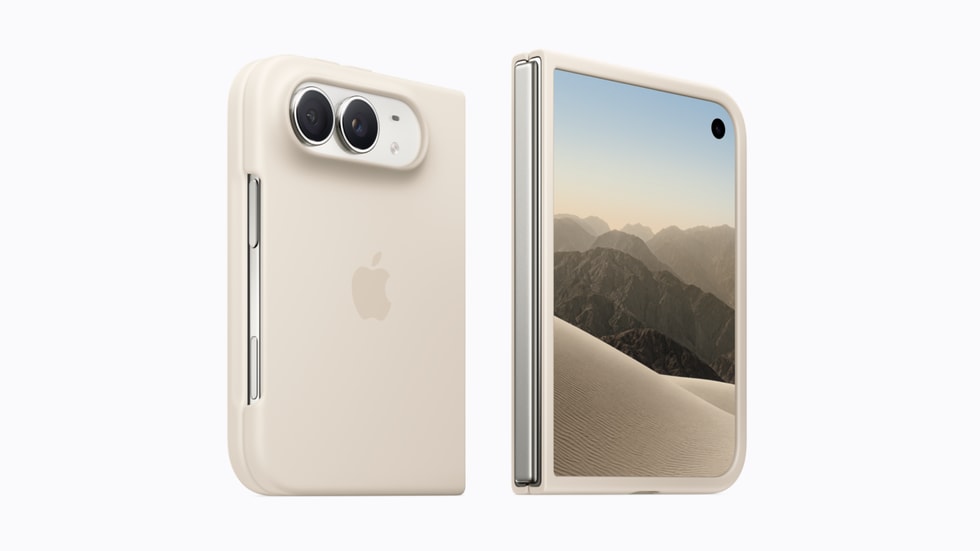
Every iPhone Fold storage size and price
Our iPhone Duo models, colors and prices hub puts both finishes at each capacity in one place, so you can compare complete configurations rather than storage alone.
The iPhone Fold storage decision starts with four choices. Apple calls the phone iPhone Duo and lists 256GB, 512GB, 1TB and 2TB in its technical specifications. There is no smaller capacity in that list. If you are comparing listings, check both the model name and capacity so that you are comparing the same purchase.
The US prices below are before tax, trade-in credit and any separately purchased extras. They match the figures in our iPhone Fold price guide. Treat the full price as your starting point even if you plan to pay monthly: spreading payments changes the timing, not the storage premium.
| 256GB | $1,999 — lowest listed price |
|---|---|
| 512GB | $2,199 — $200 above 256GB |
| 1TB | $2,599 — $400 above 512GB |
| 2TB | $3,199 — $600 above 1TB |
There is no single best size for everyone. A person who keeps a modest selection of photos and downloads has a different problem from someone who wants a large video collection available without a connection. The useful question is not which number looks safest. It is which capacity fits your habits without making you pay for space you have no plan to use.
Start with what you already use
Before choosing a capacity, look at the storage breakdown on your current phone. Write down the total used and the biggest categories. Separate things you want to keep from things you could comfortably remove. An old downloaded series is a different commitment from family videos you want with you. This small check is more useful than a general recommendation based only on price.
Next, think about whether the current number reflects normal use. Perhaps you recently cleared space because the phone was full. Perhaps you downloaded films for a trip and have not removed them. Either situation can give a misleading baseline. Use a typical month as your reference, and consider what you have already moved elsewhere because it would not fit.
Leave room for change rather than aiming to fill your new phone immediately. You do not need a precise prediction of every future file. Ask whether you expect to keep the phone longer, record more video or carry more work material. If your current storage is already uncomfortable, buying a similar amount of space may preserve the same problem.
256GB: choose it when your needs comfortably fit
Compare the 256GB Night Sky and 256GB Star White configurations at this capacity, including official photos and product details.
The 256GB iPhone Duo costs $1,999 before tax, making it the lowest-priced capacity. It is the sensible starting point for a buyer whose existing local library is comfortably smaller and whose habits are unlikely to change dramatically. Choosing the entry capacity is not automatically a compromise. Paying less is useful when the extra space would otherwise sit unused.
This is a stronger choice when you already have a routine for managing downloads and reviewing older files. The key is that the routine should feel normal, not like an extra chore you are promising to adopt after spending money. If you dislike clearing space today, do not build your purchasing decision around suddenly enjoying it on a new phone.
Be more cautious if your current device is nearly full or if you have been keeping important material off it purely to save room. Also consider your next trip or project. A phone that fits your quietest week may not fit your busiest one. Choose 256GB because your actual needs fit, rather than because it produces the smallest advertised payment.
512GB: pay $200 for more breathing room
Compare the 512GB Night Sky and 512GB Star White configurations at this capacity, including official photos and product details.
The 512GB model costs $2,199 before tax. That is $200 more than 256GB for twice the listed capacity. It is the smallest price step in the range, which makes it worth considering if you are uncertain about the entry model. The comparison is straightforward: would additional room remove a recurring frustration, or would you be buying it mainly for reassurance?
Consider 512GB when your current storage use leaves too little room for the way you want to use your next phone. You may want to retain more photos locally, carry a larger selection of downloads or stop deciding what to remove before a trip. None of those habits makes this capacity compulsory. They simply give the upgrade a practical purpose.
Do not turn “more breathing room” into a promise that you will never manage storage again. Any capacity can become uncomfortable if your library keeps growing. The advantage here is a larger allowance, not unlimited space. If 256GB already gives you generous room and you are happy with your current habits, keeping the $200 is a reasonable decision.
1TB: for a deliberately larger local library
Compare the 1TB Night Sky and 1TB Star White configurations at this capacity, including official photos and product details.
The 1TB model costs $2,599 before tax, which is $400 above 512GB and $600 above 256GB. That larger step deserves a clearer reason than simply wanting a premium version. Think about the material you intend to keep on the device and why it needs to remain there. A large, frequently used local collection is a stronger reason than an undefined future possibility.
Video is worth examining closely. Apple lists 4K Dolby Vision recording, including up to 120 frames per second on the Fusion Main camera, alongside other recording modes. Those options make your recording habits relevant to capacity planning. They do not establish a universal number of recording hours for each storage tier. We are not assigning fixed file sizes to those modes here.
If you already create substantial video projects, use your own recent files as a guide. Consider how much material you retain between transfers and whether you need it available while away from your usual setup. The 1TB choice becomes easier to justify when it supports an existing workflow. It is harder to justify when the workflow is something you might try once.
2TB: the largest option, not the automatic winner
Compare the 2TB Night Sky and 2TB Star White configurations at this capacity, including official photos and product details.
At $3,199 before tax, 2TB is the largest listed capacity and the most expensive iPhone Duo storage option. It adds $600 over 1TB and $1,200 over the entry model. Those are meaningful differences. Before choosing it, explain to yourself what the additional space will hold and why a smaller option would create a problem.
This is a capacity to consider when keeping a very large amount of material locally is a deliberate priority. You might prefer to carry a broad working library rather than repeatedly change what is on the phone. But having the largest option does not remove the need to organize files, check important copies or understand where your material is stored.
Do not buy 2TB on the assumption that it includes a better display or camera. Apple presents the capacity choices within one iPhone Duo specification, rather than listing separate camera or display upgrades for those tiers. Our iPhone Fold specifications guide covers the hardware separately. Choose storage for the room it gives you, not an unlisted performance benefit.
Cloud storage and offline needs are different questions
Before using a cloud service as the reason to buy less local storage, check how your own setup works. Which files stay on the phone? Which require a download before you can use them? What have you marked for offline access? The answers matter more than a broad claim that everything is “in the cloud.” Test the material you actually need.
Think about situations where a connection is inconvenient or unavailable. Prepare a realistic selection of the music, documents and video you would want for a trip, then check what that selection requires. You do not have to keep your entire library locally to benefit from additional capacity. Equally, you do not have to buy the largest phone to carry a useful offline collection.
Compare ongoing service spending separately from the hardware upgrade. A larger phone and an online storage service solve overlapping but different problems. Do not assume one automatically replaces the other. If your plan depends on removing local copies, understand what remains accessible and how you would recover important material before deciding that a smaller phone will be comfortable.
Compare the total upgrade cost, not just the payment
Put the storage premium beside the rest of your purchase budget. Moving from 256GB to 512GB adds $200; moving from 256GB to 1TB adds $600; choosing 2TB instead adds $1,200. Tax and optional purchases are separate. If the larger capacity competes with something else you need, make that trade-off explicit rather than hiding it inside a monthly figure.
For a simple illustration, spreading the $200 first step over 24 months is about $8.33 per month. The $600 difference is $25 per month, and $1,200 is $50 per month. These are arithmetic comparisons, not financing offers or checkout quotes. Read our Apple Card Monthly Installments guide before treating a monthly payment as your complete bill.
Trade-in can change the amount you need to pay, but it should not decide your capacity for you. Estimate the storage requirement first, then apply the offer you actually receive. Our iPhone Duo trade-in guide explains that part of the purchase. A credit is not a reason to abandon a budget you were otherwise comfortable with.
Choose your preferred model before checking stock
Write down a first choice and, if you want one, a fallback. For example, you might prefer 256GB but accept 512GB at its listed premium. Alternatively, you might need 1TB and decide that a smaller phone would not work. Both approaches are clearer than opening an inventory page and letting whichever model appears first decide your budget.
Keep appearance separate from capacity. If you are also choosing a finish, use our iPhone Fold colors guide to decide which combinations you would accept. Then browse live inventory or use the Store Locator. A stock listing is a shopping lead, not confirmation of a completed pickup order.
A final check before you pay
- Capacity: does the order show the storage size you chose?
- Price: are you comfortable with the total, not only the monthly amount?
- Use: can you explain what the extra capacity is for?
- Fallback: is an available alternative genuinely acceptable?
Once the phone arrives, assess it against your real needs rather than trying to fill the available space. If you are considering exchanging capacities, read the applicable terms first; our Apple return policy guide is a starting point. The strongest storage choice is the one that supports your normal habits at a price you intended to pay.
Paying monthly? See Apple Card installments and trade-in math by size.
Questions and answers
What iPhone Fold storage sizes does Apple offer?
Apple lists iPhone Duo in 256GB, 512GB, 1TB and 2TB capacities.
How much does each storage size cost?
US prices before tax are $1,999 for 256GB, $2,199 for 512GB, $2,599 for 1TB and $3,199 for 2TB.
Which iPhone Duo storage size should I buy?
Start with your current storage use and expected growth. Choose 256GB if your needs comfortably fit, 512GB for additional room, and 1TB or 2TB when you have a clear reason to keep a large local library.
Does more storage mean a better camera?
Apple lists one camera specification for iPhone Duo rather than separate camera systems for the storage tiers. More capacity gives you room for files, not a listed camera upgrade.
Can cloud storage replace a larger phone?
Cloud services can change what you keep locally, but do not assume every file will be available offline. Check the services and download settings you actually use.
Should I buy a larger size just because it is in stock?
Only if you are comfortable paying the difference. Decide your preferred capacity and maximum acceptable price before checking availability.
More answers about checks, alerts and plans are in the Produce Checker help and FAQ, and more guides are on the iPhone Duo stock blog.
Produce Checker is not affiliated with Apple Inc. Capacities and US prices are based on Apple's specifications and store information, checked November 12, 2026. Prices exclude tax. Stock and alerts aren't guaranteed; Apple confirms pickup at checkout.